
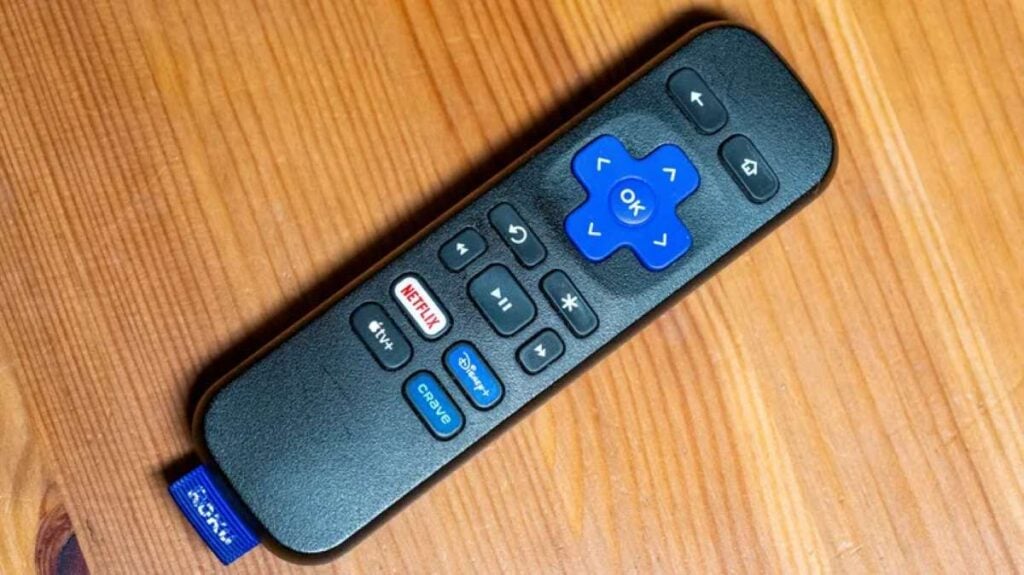

If your Roku remote always seems to vanish right when you’re ready to watch something, Roku’s lost remote finder feature can be a huge help.
On compatible Roku remotes, this feature makes the remote play a sound so you can track it down quickly. You can activate it in a few different ways, including with a hands-free voice command, the free Roku mobile app for iPhone or Android, your Roku streaming device, or a Roku TV.
This guide will help you figure out whether your Roku remote supports lost remote finder, how to use it, and how to adjust the settings so it works the way you want.
As an Amazon Associate, I earn from qualifying purchases.
How to Use Roku’s Lost Remote Finder
If your Roku remote has a habit of disappearing into the couch cushions, the lost remote finder feature can be a lifesaver.
On compatible Roku remotes, this feature makes your remote play a sound so you can track it down quickly. You can activate it in a few different ways, including with a hands-free voice command, the free Roku mobile app for iPhone or Android, your Roku streaming device, or your Roku TV.
Once the sound starts playing, just follow the chime until you find the remote hiding under a blanket, behind a pillow, or wherever it managed to sneak off to this time.
Before you begin: Does your Roku remote work with lost remote finder?
Roku’s lost remote finder only works with compatible Roku voice remotes that have a built-in speaker. This includes remotes like the Roku Enhanced Voice Remote and the Roku Voice Remote Pro 2nd Edition.
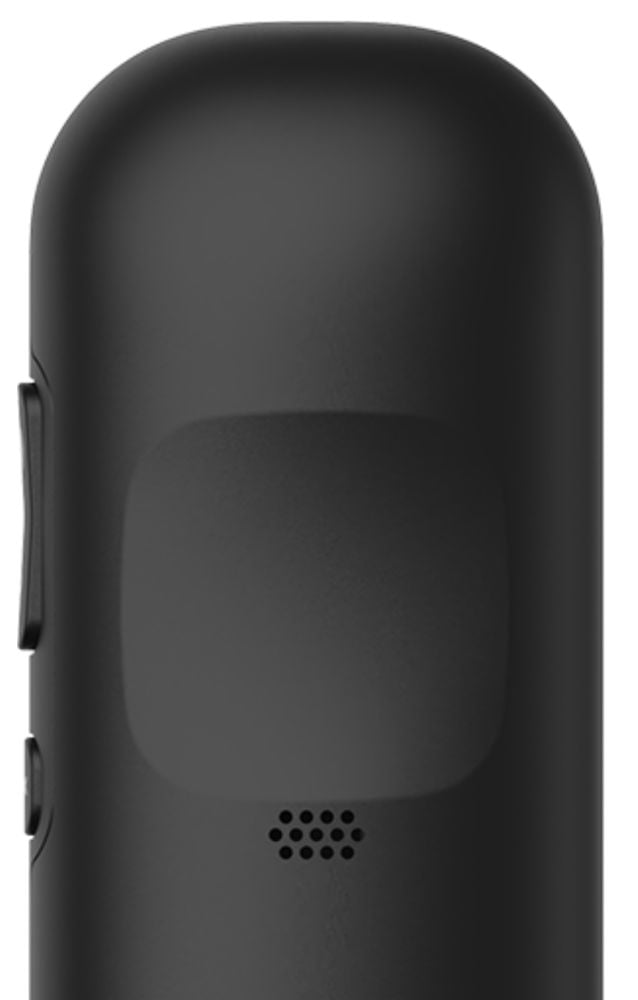
Not sure if yours has it? Flip your remote over and look for tiny speaker holes on the back. If you see them, there’s a good chance your remote supports the feature. If not, and you really want this handy option, you can buy an upgraded remote from the Roku accessories store.
Depending on your Roku device and remote, you may be able to activate lost remote finder in a few different ways. You can use a hands-free voice command, the Roku mobile app, or the lost remote finder button on your Roku streaming device.
Once you turn it on, your remote will play a sound for up to 60 seconds, making it much easier to track down. When you find it, just press any button on the remote to stop the sound.
Just keep in mind: this feature won’t work if the batteries are dead, the rechargeable battery is too low, or the remote is too far away from your wireless network.
1. Trigger lost Roku remote finder with a voice command
If you have a Roku Voice Remote Pro or Roku Voice Remote Pro 2nd Edition, finding your missing remote can be as simple as asking for it.
Just say, “Hey Roku, where’s my remote?” in a clear, natural voice. If your remote hears you, it should start playing a sound so you can follow the chime and track it down.
The only catch is that hands-free voice needs to have been turned on before the remote went missing. If it wasn’t, or if your remote is too far away to hear your command, you’ll need to use another method, like the Roku mobile app or the lost remote finder button on your Roku device.
2. Trigger lost remote finder in the Roku mobile app
Another easy way to find your missing Roku remote is through the free Roku mobile app. Once the app is installed on your phone, you can use it to make your remote play a sound.
Open the Roku app and tap Devices in the navigation bar. From there, select your Roku device to connect to it. Once it’s connected, tap the three dots next to your device and choose Ping Remote. Your remote should start making a sound so you can follow it and find where it’s hiding.
You can also use the Roku app as a temporary remote and turn on the lost remote finder from your Roku settings.
To do that, tap the Remote icon in the app, then press Home to go to your Roku’s home screen. From there, go to Settings, select Remotes & devices, then Remotes. Choose your remote, then select Find remote.
Once the sound starts playing, just listen for the chime and follow it until you find your remote.
3. Trigger lost Roku remote finder on your streaming player
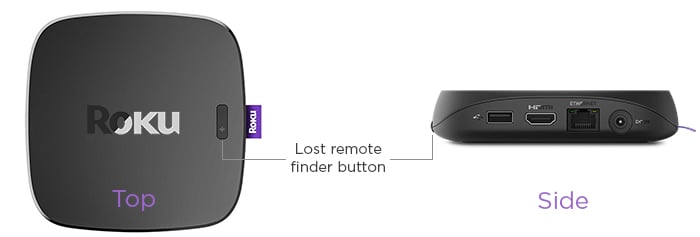
Some Roku devices, like the Roku Ultra, make this even easier with a physical lost remote finder button built right into the player.
Look for the button on the top or side of your Roku device. Once you press it, your compatible Roku remote should start playing a sound, making it much easier to track down.
From there, just follow the chime until you find your remote buried in the couch, tucked under a blanket, or sitting somewhere you swear you already checked.
Read Also: How to Pair a Roku TV Remote Without a Pairing Button (Easy Step-by-Step Guide)
How to Never Lose Your Roku Remote Again
Few things are more annoying than finding your Roku remote, only to realize it has vanished again. The good news? You can make it much harder to lose with a few simple habits and clever add-ons that keep it visible, reachable, and in one place.
1. Give your Roku remote a “home”
One of the easiest ways to stop losing your Roku remote is to give it one official place to live.
This can be a small tray on your coffee table, a little basket beside the couch, or even a sofa caddy that hangs over the armrest. The exact spot doesn’t matter as much as making sure everyone in the house knows: this is where the remote goes when you’re done using it.
It might feel a little silly at first, but this simple habit can save you a lot of frustration. Instead of checking under pillows, between cushions, and all over the room, you’ll know exactly where to look first.
The trick is to make it a household rule. When someone finishes watching TV, the remote goes back in its “home.” No exceptions. After a while, it becomes automatic.
2. Make the Roku remote easier to see and harder to lose
Roku remotes are small, slim, and very good at disappearing into couch cushions. So one smart fix is to make your remote bigger, brighter, and easier to spot.
A colorful silicone case can make a big difference. Look for one in a bright neon color, a glow-in-the-dark design, or a textured style that’s easier to feel between cushions. That way, your remote won’t blend into the couch or vanish into a dark corner as easily.
You can also choose a case with an extended tail, like a Streamer Tails-style cover, which makes the remote much harder to slip between couch cracks unnoticed. Another simple option is to attach a bright lanyard, ribbon, or piece of string to it.
The goal is simple: make your remote stand out. The bulkier and brighter it is, the less likely it is to disappear without you noticing.
3. Tether the Roku remote so it can’t wander off
If your Roku remote keeps disappearing no matter what you try, it might be time for a more “can’t lose it even if you tried” solution.
One option is to use a retractable remote leash. These work a bit like the retractable cords you see on keychains or badge holders. You attach one end to the remote and secure the other end to something nearby, like the underside of your couch, a side table, or an entertainment stand.
That way, the remote can still be used comfortably while you’re watching TV, but it can’t travel too far. No more finding it in another room, under a pile of blankets, or mysteriously wedged between couch cushions.
You can also use a simple piece of string, cord, or lanyard if you don’t want to buy anything fancy. It may not look as sleek, but it gets the job done.
4. Add a tracker to your Roku remote
Another smart trick is to attach a small Bluetooth tracker to the back of your Roku remote.
Devices like an Apple AirTag or Tile tracker can help you locate your remote using your phone. Just stick the tracker to the flat back of the remote with strong double-sided mounting tape, and you’ll have a much easier way to track it down the next time it goes missing.
This is especially helpful if your remote tends to end up in odd places, like under the couch, inside a blanket, between bed sheets, or carried off by a child.
Once the tracker is attached, you can use the tracker’s app to make it play a sound or check its last known location. It adds a little bulk to the remote, but honestly, that can be a good thing. A slightly chunkier remote is much harder to lose.
Read Also: The 16 Roku Hacks That Instantly Upgrade Your TV and Make Streaming So Much Better