

You know how it goes… you download an app because it promises to make your life easier. Faster. Smarter. Maybe even “optimize” your phone. But over time, your phone starts to feel… cluttered. Slower. And honestly, a little overwhelming.
Here’s the thing most people don’t realize: your iPhone already does way more than you think. Apple has quietly built in tools for things like scanning documents, managing passwords, even automating tasks. So a lot of these extra apps? They’re not just unnecessary—they can actually create problems.
And I’m not trying to scare you, but some of these apps can track your data, drain your battery, or run in the background without you even noticing. It’s like inviting strangers into your home when you already have everything you need inside.
In this article, we’re going to walk through a few types of apps you can safely let go of. Think of it as a little “spring cleaning” for your phone—simple, freeing, and honestly… kind of satisfying.
1. Flashlight Apps — A Risk You Don’t Need
This one always surprises people.
Back in the day, flashlight apps made sense. Phones didn’t come with a built-in flashlight, so you had no choice but to download one. But those days are long gone—and yet, people still have these apps sitting on their phones.
Here’s the problem: a lot of flashlight apps don’t just turn on your light. They can run in the background, show ads, or even access parts of your phone they don’t really need to. And over time, that can actually wear down your phone’s flash or drain your battery more than necessary.
Meanwhile, your iPhone already has a perfectly good flashlight built right in. Just swipe down to open the Control Center, tap the flashlight icon, and you’re good to go. You can even adjust the brightness by holding the button—no extra app needed.
So if you’ve got a flashlight app sitting on your phone, this is your sign to delete it. It’s one less thing taking up space—and one less thing quietly working behind the scenes.
Sometimes, simpler really is better.
2. Document Scanner Apps — A Privacy Concern
Let me ask you something… have you ever quickly scanned a receipt, a form, or even your ID using a random app you downloaded in a rush?
Most of us have. It feels harmless in the moment. But when you really think about it… you’re handing over some pretty sensitive information to an app you barely know.
That’s the part people don’t talk about enough.
A lot of these document scanner apps store or process your scans through their own systems. That means things like your address, financial info, or personal documents could be sitting on someone else’s server somewhere. And even if they say they’re secure… you’re still taking a risk you don’t need to take.
Here’s the good news—you already have a safer option sitting right on your phone.
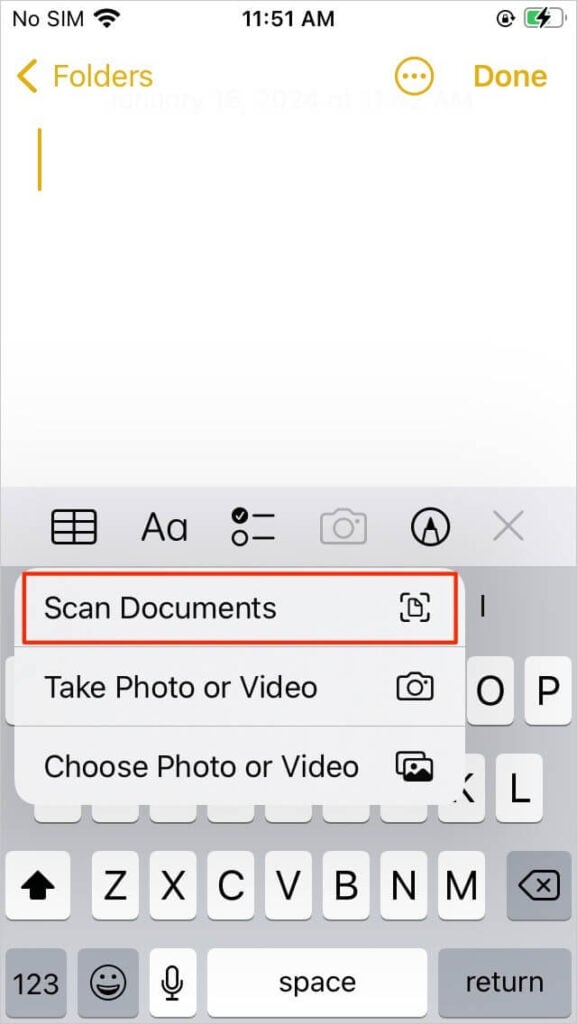
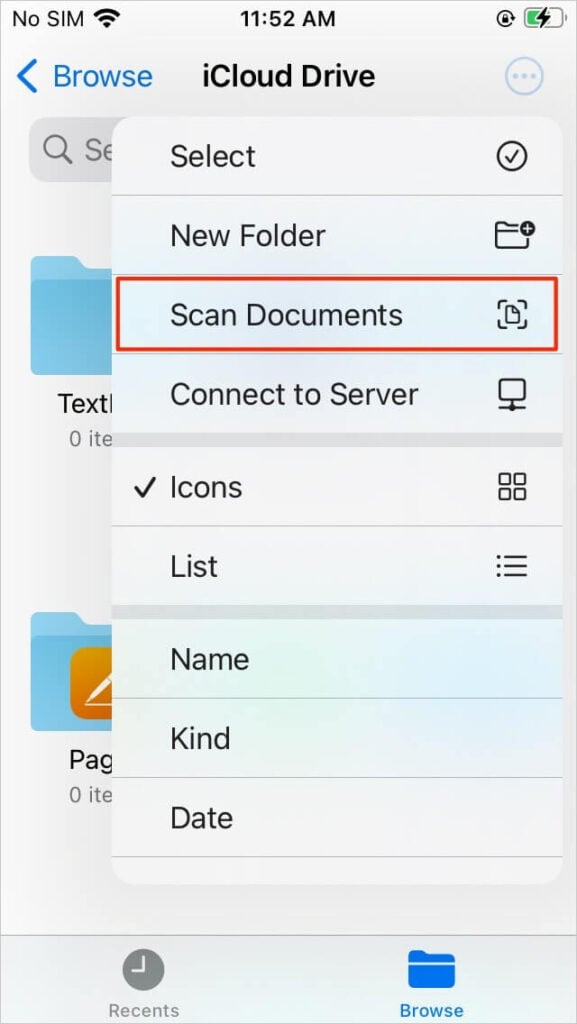
Open your Notes app, start a new note, tap the camera icon, and select “Scan Documents.” That’s it. It automatically detects the page, cleans it up, and saves it neatly—without sending your information off to some third-party app.
It’s one of those hidden features that feels almost too easy once you start using it. And honestly, once you do, you’ll wonder why you ever trusted another app with something so personal.
3. PDF Signature Apps — Completely Redundant
Okay, this one is a big one—especially if you’ve ever had to sign a document quickly.
You get an email, there’s a PDF attached, and your first thought is, “Ugh, I need an app for this.” So you download one, create an account, maybe even deal with a subscription… just to scribble your name.
But here’s the truth: you never needed that app in the first place.
Your iPhone already lets you sign documents in seconds.
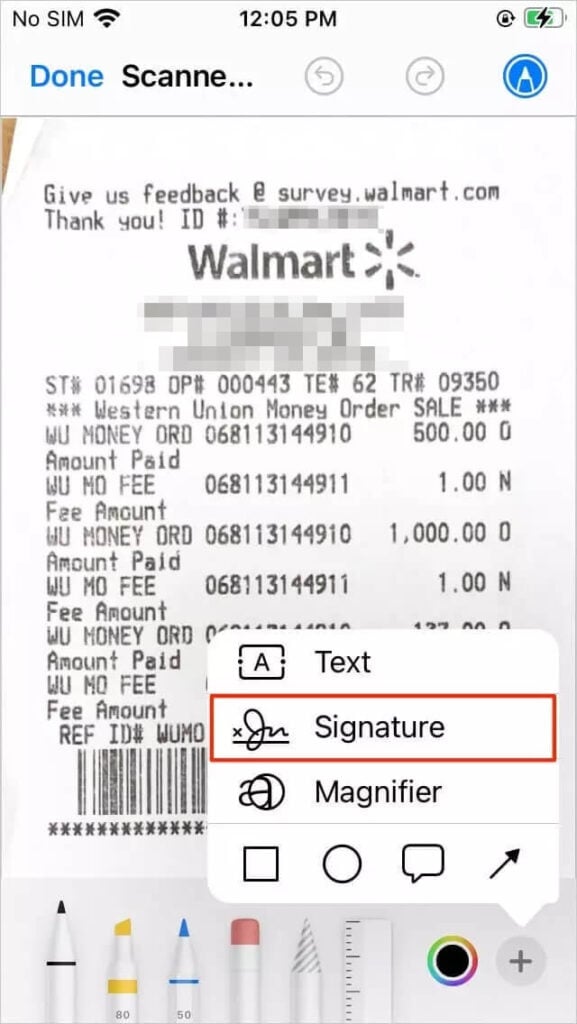
All you have to do is open the PDF (in Files or even Photos), tap the little markup icon (it looks like a pen), then hit the plus (+) button and choose “Signature.” You can draw your signature once and reuse it anytime.
That’s it. No logins. No extra apps. No wondering where your signed documents are being stored.
And when you think about it… signing documents is kind of a big deal. These could be contracts, agreements, personal forms. Do you really want that going through some random app you downloaded five minutes ago?
Probably not.
This is one of those small changes that just makes life easier—and a whole lot more secure.
4. QR Code Scanner Apps — Already Built-In
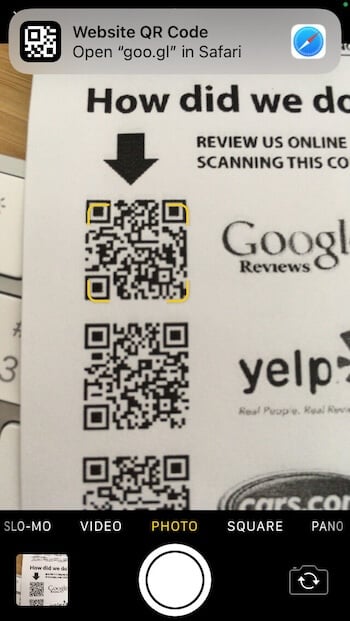
You’ve probably done this before… you’re at a restaurant, there’s a QR code on the table, and your first instinct is, “Do I need an app for this?”
So you go to the App Store, download a QR scanner, open it once… and then forget it’s even there.
But here’s the funny part—you never needed that app to begin with.
Your iPhone camera already scans QR codes automatically. No setup, no download, no extra steps. You literally just open your camera, point it at the code, and a little notification pops up. Tap it, and you’re in. That’s it.
Now here’s where it gets a bit concerning…
A lot of third-party QR apps aren’t just “scanners.” They’re loaded with ads, trackers, and sometimes even sketchy redirects. So instead of quickly opening a menu or a link, you might end up clicking through pop-ups or being nudged toward something you didn’t intend to visit.
And honestly, it’s just unnecessary friction.
Once you realize your camera does it all, you’ll never go back. It’s faster, cleaner, and you don’t have to wonder what’s happening behind the scenes.
5. Password Manager Apps — Potential Security Risk
Let’s be real for a second—keeping track of passwords is exhausting.
You’ve got logins for email, banking, shopping, social media… and they all want something different. So it makes sense why password manager apps sound like a lifesaver.
And to be fair, they can be helpful.
But here’s the catch: if that one app gets compromised, everything is at risk.
Think about it like this—it’s like putting all your keys into one box and hoping no one ever gets access to it. If they do, they don’t just get one account… they get your whole digital life.
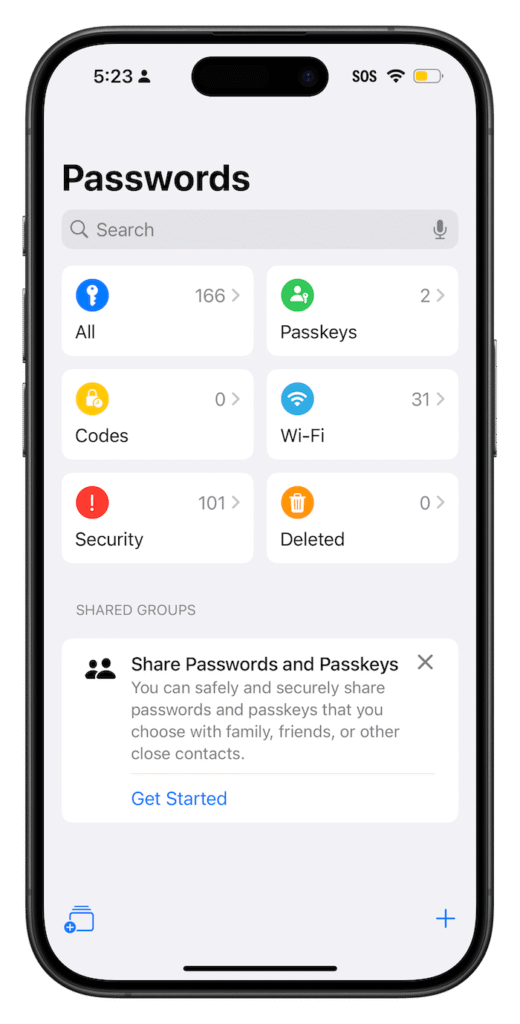
That’s why Apple built its own password manager directly into your iPhone.
If you go into Settings → Passwords, you’ll see everything stored securely. It even suggests strong passwords, warns you if one has been exposed in a data breach, and automatically fills them in when you log into apps or websites.
And the best part? It’s deeply integrated into your phone’s security system—things like Face ID and encryption—so it’s not relying on some external service you barely know.
Once you start using it, it just quietly works in the background. No extra app to open. No extra thing to manage.
And honestly… that peace of mind is worth a lot.
6. Automation Apps — Overcomplicating Things
I get the appeal of automation apps. The idea of your phone “doing things for you” sounds amazing, right? Like turning off Wi-Fi at a certain time, sending messages automatically, or setting up routines.
But here’s what usually happens…
You download one of these apps, open it up, and suddenly you’re staring at a bunch of confusing options, triggers, conditions… and you’re thinking, “Wait, this is more work than what I was trying to automate.”
That’s the part no one tells you.
A lot of these apps try to reinvent something your iPhone already does—and honestly, they don’t always do it well. They can be clunky, require permissions you’re not fully comfortable with, and sometimes just don’t work consistently.
Meanwhile, Apple already built a tool for this called Shortcuts.
And I know what you might be thinking—“That sounds complicated too.” But it doesn’t have to be.
You can keep it super simple. Want your phone to go into Do Not Disturb at bedtime? There’s a shortcut for that. Want to open your favorite apps with one tap? Done. You can even browse ready-made automations and tweak them slightly.
The difference is—it’s built into your phone, it’s secure, and it actually plays nicely with everything else.
So instead of adding another app (and another layer of complexity), you’re just using what’s already there… in a much cleaner, simpler way.
7. Third-Party Weather Apps — More Noise Than Value
This one might feel a little surprising… because weather apps seem harmless, right?
I mean, who doesn’t check the weather before heading out?
But here’s what I’ve noticed—and maybe you have too. A lot of third-party weather apps aren’t just giving you the forecast. They’re packed with ads, notifications, “premium upgrades,” and sometimes even location tracking that feels a little… excessive.
You open the app just to see if it’s going to rain, and suddenly you’re swiping past ads, closing pop-ups, or getting alerts you didn’t ask for.
It turns something simple into something noisy.
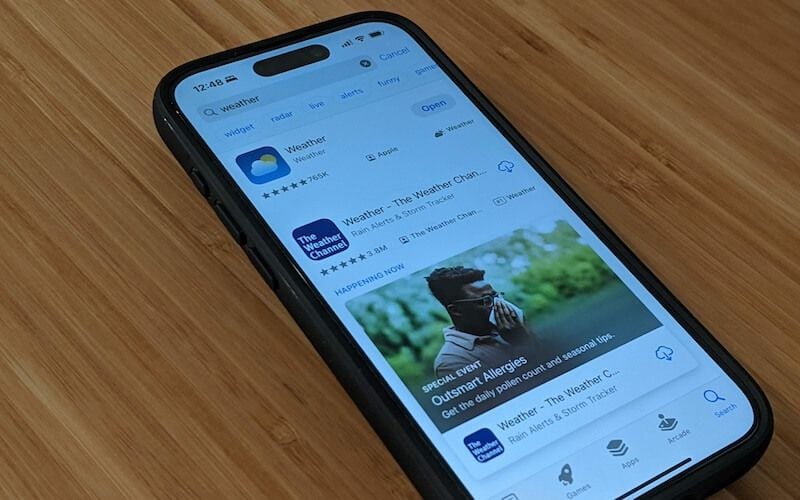
Now compare that to the built-in Weather app on your iPhone.
It’s clean. It’s straightforward. It gives you what you actually need—temperature, hourly forecast, rain chances—without trying to upsell you or distract you.
And here’s something most people don’t realize: Apple’s weather app has gotten really good. You can see things like air quality, precipitation maps, and even severe weather alerts—all without downloading anything extra.
So unless you have a very specific need (like hyper-detailed radar tracking), most third-party weather apps are just adding clutter to your phone.
And honestly… checking the weather should feel quick and easy—not like you’re stepping into a mini marketplace every time.
Sometimes the best app is the one that quietly does its job—and then gets out of your way.
8. Battery Saver Apps — Misleading Promises
Okay, this one might be the most misleading of them all.
Battery saver apps sound so convincing. They promise longer battery life, better performance, and all kinds of “optimizations.” And if your phone’s battery has ever dipped into the red, it’s tempting to believe them.
But here’s the honest truth…
No app can magically improve your battery beyond what your iPhone is already designed to do.
In fact, most of these apps are doing the opposite.
They run in the background, monitor your usage, and constantly try to “manage” things—which actually uses more battery, not less. So the thing you downloaded to save battery… ends up draining it instead.
Now here’s what actually works—and it’s already on your phone:
- Low Power Mode – instantly reduces background activity
- Battery Health – shows you how your battery is aging
- Usage Insights – tells you exactly which apps are draining your battery
And once you start paying attention to that last one, it’s kind of eye-opening. You’ll quickly spot which apps are the real culprits—and it’s usually not what you expect.
So instead of trusting an app that makes big promises, you’re better off using the tools Apple already gives you.
Simple. Honest. And actually effective.
Sometimes the smartest move isn’t adding more… it’s just removing what you don’t need.
Why You Should Avoid Unnecessary Apps
Let’s be honest… most of us don’t really think twice before downloading an app. It takes a few seconds, it looks useful, and we tell ourselves, “I might need this someday.”
But over time, those “just in case” apps start adding up.
And here’s what’s quietly happening behind the scenes.
First, there’s security. Every app you install is another door into your phone. Some are perfectly fine—but others? Not so much. They might request permissions they don’t actually need, or quietly collect data in the background. And the more apps you have, the harder it is to keep track of what’s accessing what.
Then there’s performance. Even if you’re not actively using these apps, many of them are still running in the background—refreshing, syncing, updating. It’s like having a bunch of tabs open on your computer. Eventually, things just start to feel slower and more cluttered.
And don’t even get me started on battery life. You know those moments where your battery drops faster than expected? It’s often not one big thing—it’s a bunch of small apps quietly draining power without you realizing it.
But maybe the biggest one is privacy.
A lot of apps make money by collecting data—your habits, your location, your usage patterns. Not always in a harmful way, but still… it’s information you’re giving away without really thinking about it.
So when you step back and look at it, keeping your phone simple isn’t just about “decluttering.” It’s about staying in control—of your time, your battery, and your personal information.
Conclusion: Trust What’s Already Built In
If there’s one thing I hope you take away from all of this, it’s this:
Your iPhone is already doing more for you than you think.
A lot of the apps we download are just duplicating features that are already built in—only with more ads, more tracking, and more complications layered on top.
So instead of adding more, sometimes the smartest move is to remove what you don’t need.
Maybe take a few minutes later today and scroll through your apps. Ask yourself, “Do I actually use this?” or “Is my phone already doing this for me?”
You might be surprised how many you can let go of.
And once you do, your phone just feels… lighter. Faster. Easier to use.
Less noise. More clarity.
Because at the end of the day, your phone should work for you—not the other way around.
Read Also: This Simple iPhone Setting Protects You From Theft While Traveling